Every piece of infrastructure eventually accumulates secrets: database passwords, API tokens, service account credentials, TLS material. For a long time those lived the way they live in a lot of small environments — scattered across notes, a password manager here, a half-remembered Kubernetes secret there. It worked, until it didn’t: a credential would get rotated and the old copy would linger somewhere, or a token needed for an automation run would take longer to track down than the actual task it was for.
HashiCorp Vault was brought in to fix that — one place for every credential in the homelab, with real access control around it instead of “whoever has the file.”
Why Vault
A few things made Vault the obvious choice over just being more disciplined about a password manager:
- It’s built for machines, not just humans. Vault is designed to be read by services and automation as much as by a person typing a password into a form. That matters in a homelab where GitLab CI/CD, Ansible, and other tooling all need credentials at runtime.
- Centralization with structure. Secrets are organized into a single, consistently-organized namespace rather than spread across whatever tool happened to be convenient at the time. Nothing gets “lost” because everything has exactly one home.
- Access control that isn’t all-or-nothing. Vault supports fine-grained policies, so different people and services can be scoped to only the secrets they actually need.
- It’s the de facto standard. Vault is what most production environments reach for, which makes it a useful thing to run and understand at home, not just at work.
How It’s Deployed
Vault runs on the Kubernetes cluster like everything else in the homelab — no special-cased server, no manual install on a random box. It uses Vault’s integrated storage (Raft) backed by NFS storage on the TrueNAS array, so there’s no separate database to keep alive just for Vault’s own data.
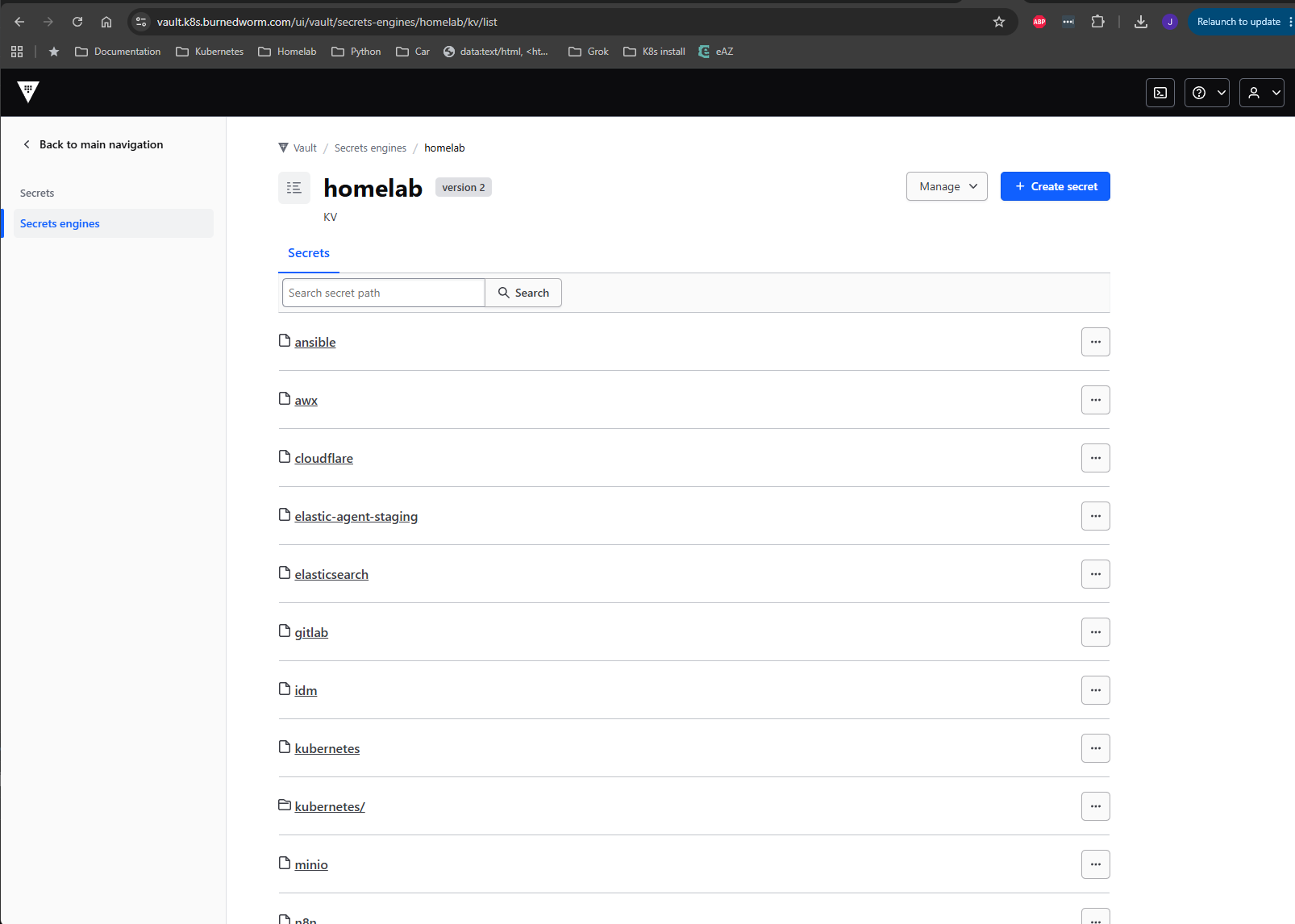
One deliberate design choice: Vault seals itself on every pod restart. That’s expected Vault behavior, not a misconfiguration — a sealed vault means the encrypted data on disk is just ciphertext until someone with the unseal key explicitly unseals it again. It’s a small bit of friction in exchange for the data at rest being meaningless without that key.
Joined to Identity, Not a Separate Login
Rather than maintaining its own user database, Vault authenticates against the same Red Hat IDM instance that runs identity for the rest of the homelab — GitLab, AWX, and other internal apps all do the same thing. That means:
- No separate Vault-only accounts to create, disable, or forget about.
- Access to Vault is controlled the same way access to everything else is: IDM group membership.
- When someone’s IDM account goes away, their Vault access goes with it automatically.
It’s one more service that plugs into the existing identity layer instead of becoming its own island.
Why This Matters for Working with Claude Code
A practical benefit that wasn’t the original motivation but turned out to matter a lot: having one well-known, consistently-organized place for credentials makes it much easier — and safer — to have an AI coding assistant like Claude Code execute infrastructure tasks.
Instead of an assistant needing secrets pasted into a prompt, hardcoded into a script, or hunted for across scattered notes, it can be pointed at a specific, predictable Vault path and retrieve exactly the credential it needs for that one task. That has two effects:
- Less exposure. Credentials don’t need to be typed into chat, committed to a file “temporarily,” or copied around to get a task done. They stay in Vault and are looked up only when needed.
- Less ambiguity. Because every secret lives at a known, structured path, there’s no guessing about which password is the current one or which of three places might have the right token. The assistant — and anyone else working in the environment — looks in one place and gets the right answer every time.
In short: the same organization that keeps a human from losing track of a credential is what lets an automated assistant act on infrastructure confidently and safely, without secrets ending up somewhere they shouldn’t.
The Result
Nothing about day-to-day homelab operations looks dramatically different from the outside, which is sort of the point. What changed is that every credential now has exactly one authoritative home, access to that home is governed by the same identity system as everything else, and both humans and automation — including AI-assisted automation — can get what they need without secrets sprawling across a dozen places. It’s the kind of infrastructure change that pays off by preventing problems rather than solving a visible one.
Jeremy Blackburn is a systems and infrastructure engineer and principal of Initech Advising LLC. He helps organizations modernize infrastructure and build reliable platforms at scale.